If you’ve ever built or integrated anything that uses webhooks, you know the pain: you push code, trigger an event, and then… nothing obvious happens. Or worse, something does happen but you have no idea what data actually arrived or in what format.
Webhook.site solves this instantly.
It’s a free, no-setup tool that gives you a unique URL (and email address) the moment you visit the site. Anything sent to that URL — webhooks, HTTP requests, form submissions, emails — appears in real time with full details: headers, query parameters, body (JSON, XML, form data, raw, pretty-printed), and more.
It’s the fastest way to test and debug webhooks without spinning up a server, opening ports, or using ngrok.
But here’s what many people don’t realize: Webhook.site is no longer just a webhook inspector. It has quietly evolved into a full-featured platform for building workflows and automations around webhooks — all running in the cloud.
The Free Core: Instant Webhook Inspection
The heart of Webhook.site remains completely free:
- Visit webhook.site → get a random unique URL immediately (e.g.
https://webhook.site/abc123...) - Also get a matching email address (
[email protected]) and even a wildcard DNS name - Send requests from your app, Postman, curl, Stripe, GitHub, or anywhere else
- Watch everything arrive live in a clean inbox-style interface
- Replay requests, view history, export data
Free tier limits (as of 2026): URLs expire after 7 days and are capped at 100 requests. Data is publicly viewable by anyone who knows the URL ID. No account required.
This is perfect for quick testing during development.
Beyond Testing: A Complete Automation Platform
When you create a free account and upgrade (Basic/Pro/Enterprise plans), Webhook.site unlocks powerful features that let you move from observing webhooks to acting on them automatically.
Custom Actions — Visual + Code Workflows That Run on Every Request
Custom Actions is the flagship feature. It lets you build workflows that execute automatically whenever your Webhook.site URL receives a request or email.
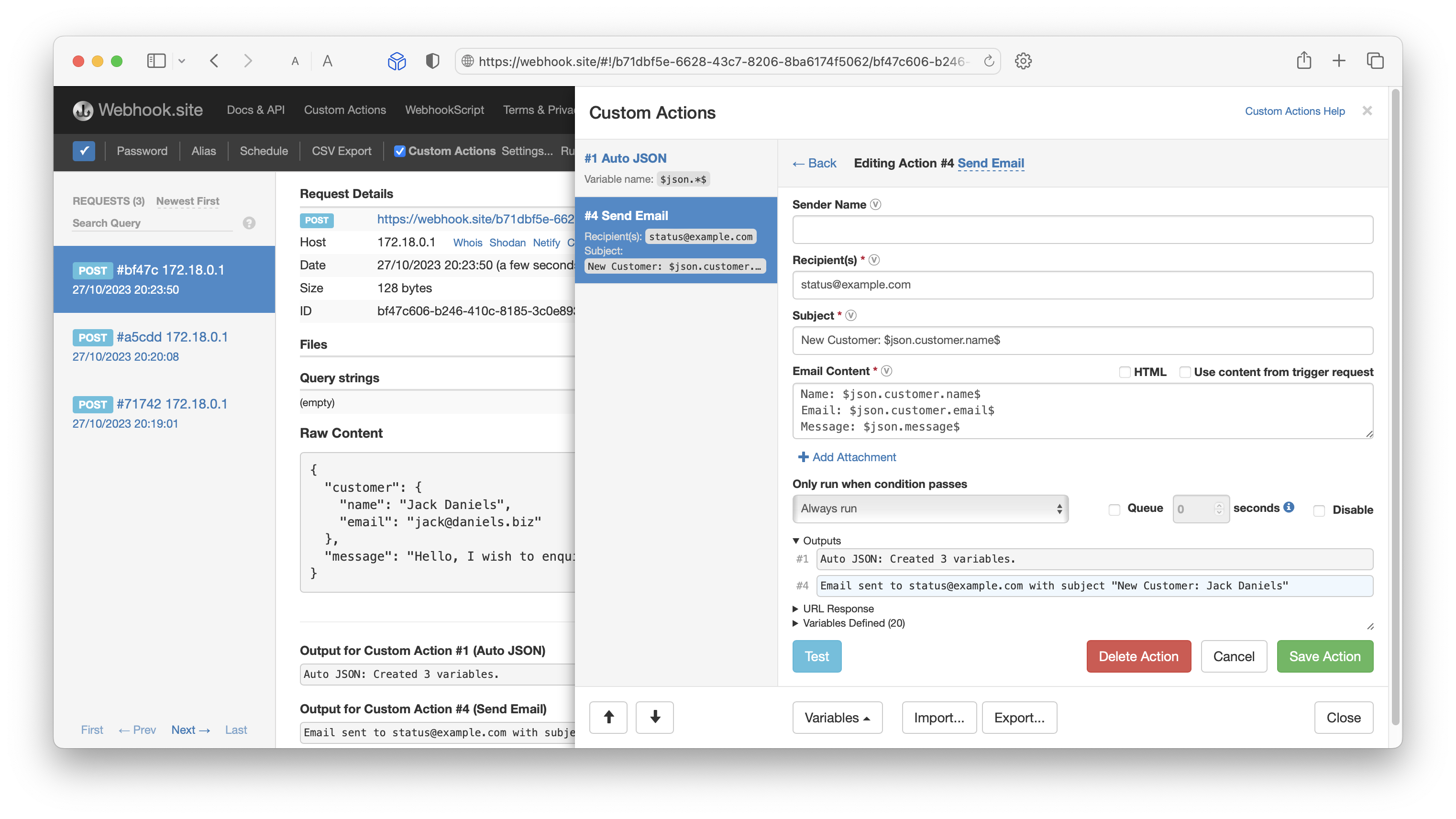
You can build these workflows in two ways:
- Visual drag-and-drop builder (with AI assistance)
- WebhookScript / JavaScript for more complex logic
Actions run sequentially in the cloud. You can pass variables between steps, add conditions, create loops, and use queued/async actions for longer-running tasks.
What can you actually do?
- Transform data (JSONPath, regex, text splitting, etc.)
- Forward or modify requests to other APIs
- Send Slack, email, or push notifications
- Save data to Google Sheets, Excel, Dropbox, S3, SFTP
- Interact with databases (more on this below)
- Post to X/Twitter, create mock servers from OpenAPI specs
- Build contact forms, lead capture flows, order processors, and more — without writing backend code
Templates and reusable action groups make it easy to standardize common patterns across your team.
In short: Custom Actions turns your webhook URL into a programmable automation endpoint.
Queues - Retry, Throttle and Control your Workflows
While Webhook.site Custom Actions can run during the request as it's processed, it's also possible to queue individual actions so they run asynchronously. This is incredibly useful when a workflow needs to run within a certain timeframe.
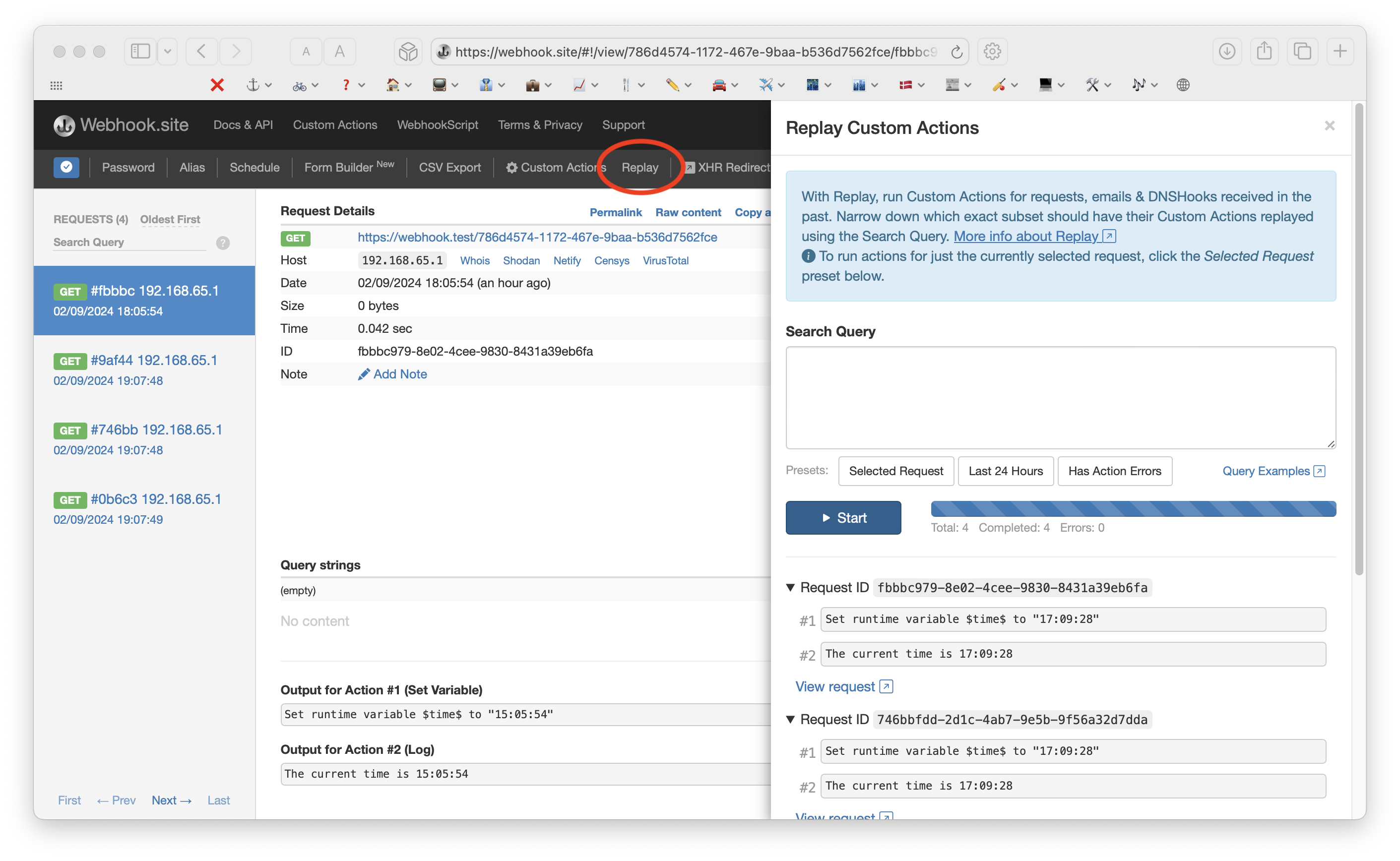
Another use case is throttling. If you are creating a workflow that, for example, connects to an API that's rate-limited, you can use Queue Profiles to limit exactly how many (and when) the actions are processed.
Read more about Queue Profiles.
Best of all, errors are logged and actions can be easily retried using the Replay feature, so you can control exactly which actions should have their workflows run a second time.
Schedules — Cronjobs for Webhooks and Workflows
Need something to happen on a schedule instead of (or in addition to) an incoming webhook?
Schedules let you trigger HTTP requests or entire Custom Action workflows on a recurring basis using either simple presets or full cron syntax.
Common use cases include:
- Uptime and SSL monitoring (with email alerts on failure)
- Cache warming or invalidation
- Periodic data synchronization or backups
- Running maintenance tasks or reports
- Polling external APIs that don’t support webhooks
You get execution logs, timeout controls, and error notifications. It’s basically “cron as a service” tightly integrated with your webhook workflows.
Databases — A Full Postgres-Compatible Database Included
One of the most powerful recent additions is Webhook.site Databases — a fully managed, PostgreSQL-compatible database (powered by CockroachDB) that lives inside the Webhook.site cloud.
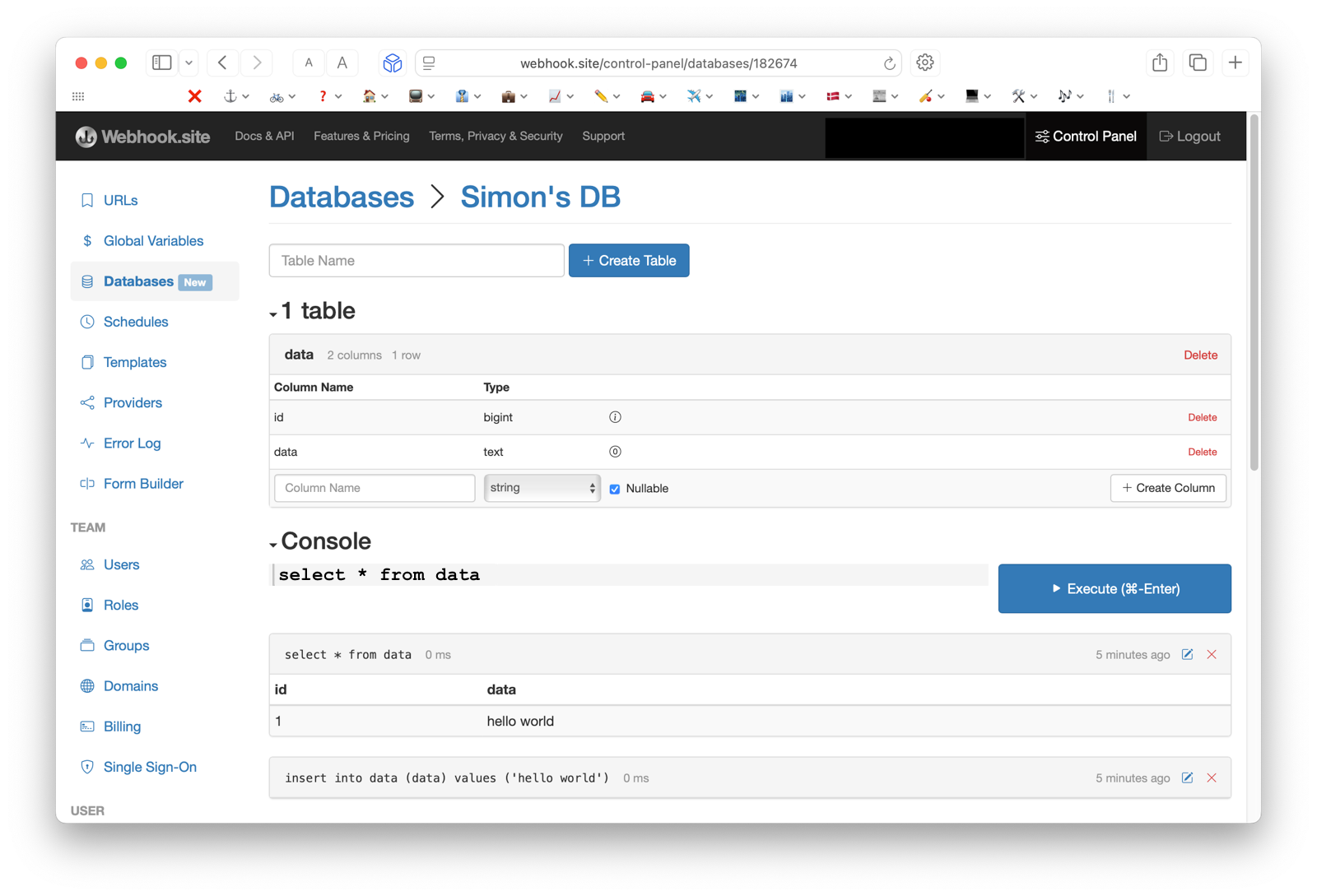
Key points:
- Create and manage tables, columns, and run queries through a simple web console or API
- Use it directly inside Custom Actions via a dedicated Database action or JavaScript functions
- Perfect for storing state across webhook invocations (user data, counters, processed IDs, temporary working data, etc.)
- Webhook.site handles all infrastructure, backups, scaling, and maintenance
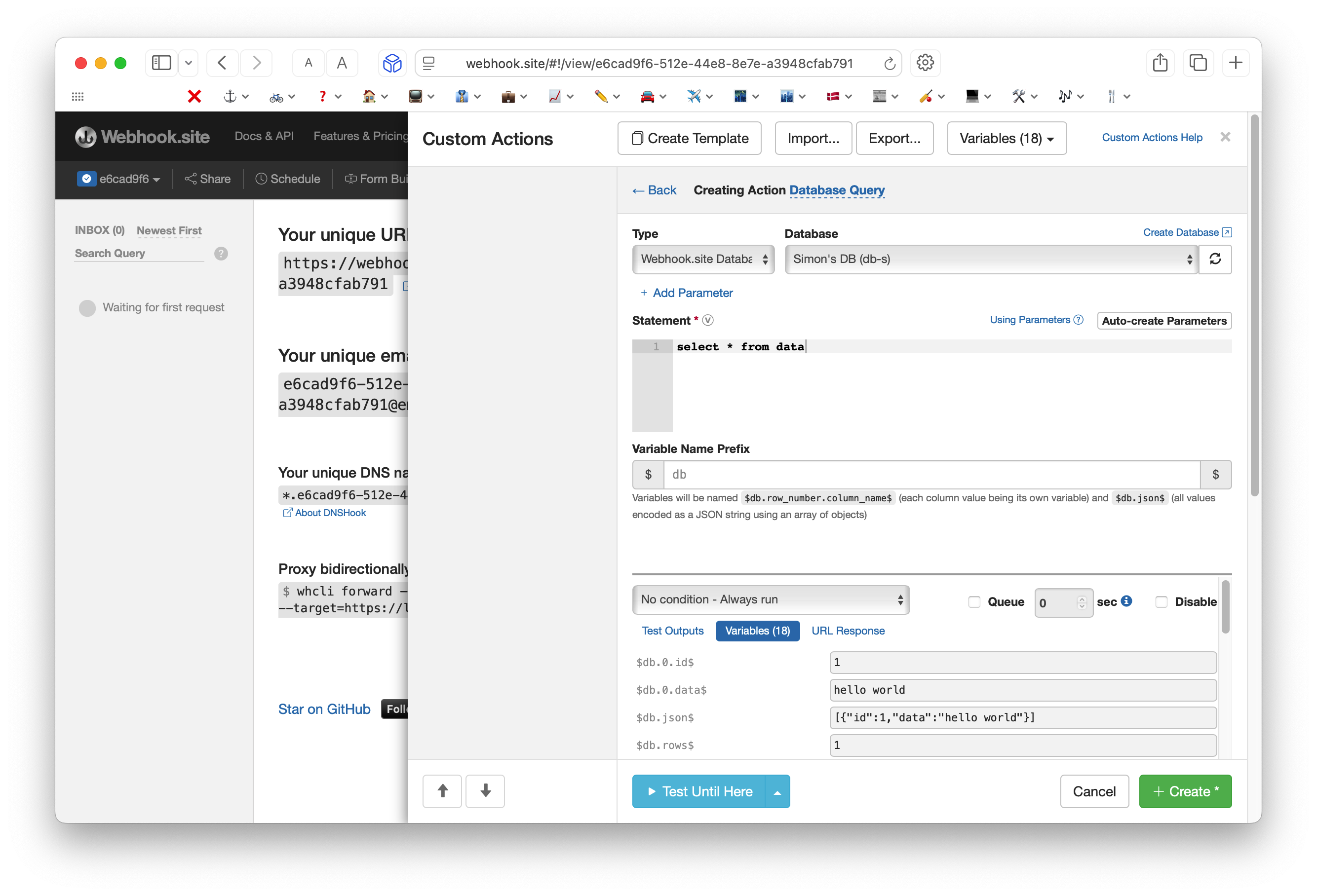
Pricing: Every subscription includes 1 free DB-S instance (100 MB storage, 1 table). Larger instances (DB-M, DB-L, and custom) are available for a monthly fee.
This removes one of the biggest friction points when building real automations: where do I persist data without managing my own database?
Who Uses Webhook.site?
- Developers testing third-party integrations (Stripe, GitHub, Shopify, etc.)
- No-code/low-code builders creating automations
- SaaS companies that need reliable inbound webhook endpoints
- Teams that want to connect systems that don’t natively talk to each other
- Anyone who wants to prototype backend logic quickly without deploying servers
Getting Started
- Go to https://webhook.site
- Use it instantly for free (no signup)
- Create an account to save URLs permanently and unlock Custom Actions, Schedules, and Databases
- Read the excellent documentation at docs.webhook.site
Final Thoughts
Webhook.site started as the simplest possible way to see what a webhook was actually sending. Today it’s much more: a complete platform that lets you inspect, transform, automate, schedule, and persist data — all in one place, with very little infrastructure.
Whether you just need to debug a single webhook or you’re building complex production automations, Webhook.site meets you where you are and grows with you.
If you haven’t tried it yet, go generate a URL right now. You’ll probably wonder how you ever tested webhooks without it.